JAD: The Reference Implementation for Dataspace-as-a-Service

Target Audience: Technical Decision Makers, Enterprise Architects, and Developers who need to run or extend the platform.
You cannot evaluate a dataspace by reading about it; you need to see it run. JAD (Just Another Demonstrator) is the reference implementation for a modern Dataspace-as-a-Service platform.
Why JAD Matters
Cloud providers evaluating dataspaces face a practical problem: how to offer the service without running a connector per customer. JAD solves this by demonstrating:
- A complete, working deployment: Full architecture, not a toy demo.
- Multi-tenant control plane: EDC-V keeps economics viable.
- Automated tenant management: Connector Fabric Manager (CFM) handles lifecycle.
- End-to-end workflows: Onboarding, credentials, catalog, negotiation, data transfer.
What is a Dataspace?
A dataspace is a network for sharing data with sovereignty: every exchange enforces identity, policy, and auditability so data owners retain control even after sharing.
What’s In The Box
JAD deploys nine core services plus supporting infrastructure. Each component is introduced in the context of the running demo.
Control Plane (EDC-V)
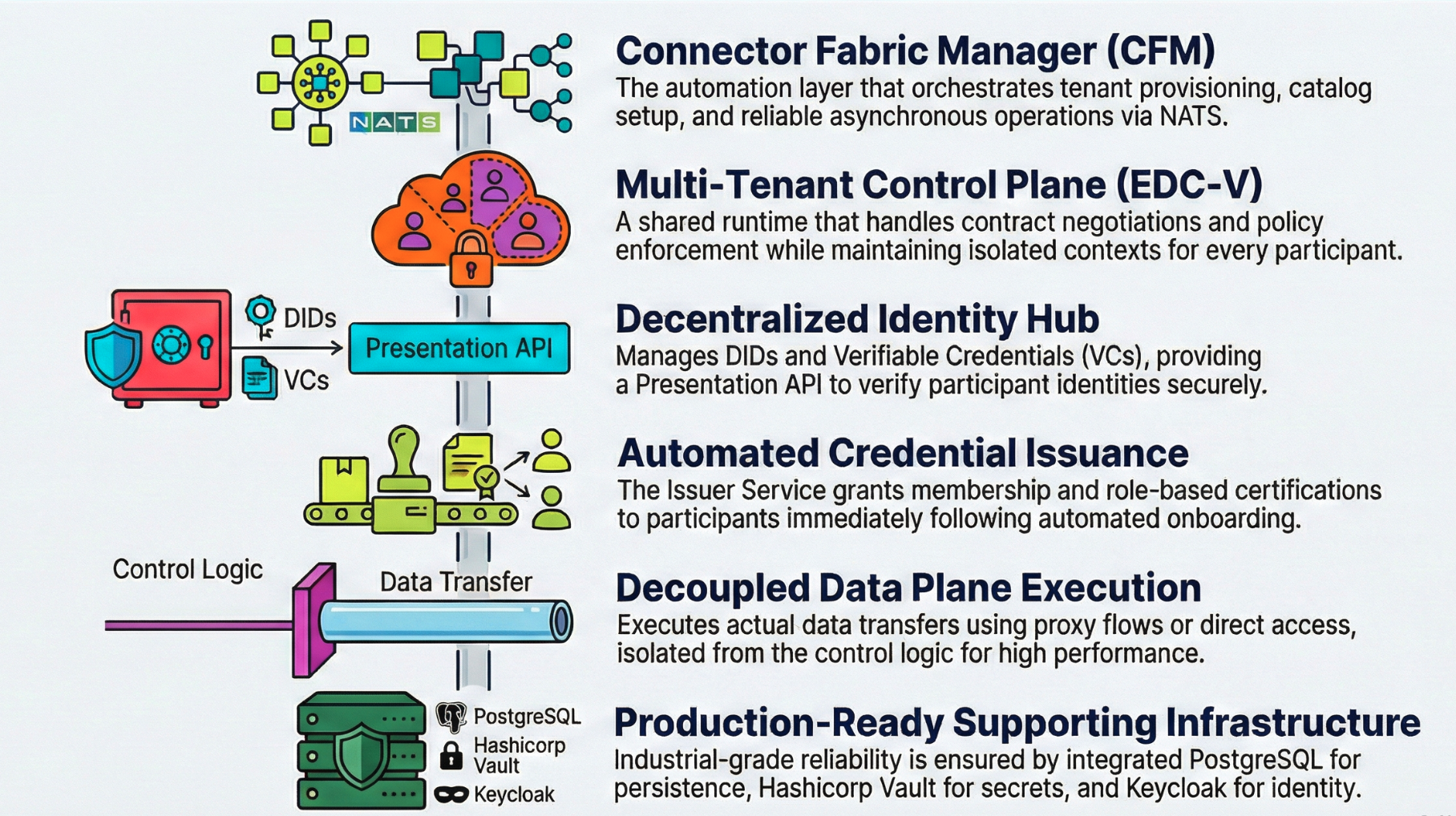
Multi-tenant control plane for negotiation and policy:
- Shared runtime with isolated participant contexts.
- Single deployment serves many tenants; per-tenant data planes when needed.
Identity Hub
Decentralized identity service:
- DIDs and Verifiable Credentials (VCs).
- Presentation API to verify credentials.
Issuer Service
Credential issuance aligned to governance:
- Issues VCs after onboarding.
- Supports multiple credential types (membership, certifications, roles).
Data Plane (EDC Connector)
Executes the actual data transfer:
- Proxy transfers; direct access with tokens; file/certificate sharing flows.
Connector Fabric Manager (CFM)
Automation layer for service providers:
- Tenant provisioning and catalog setup.
- Credential orchestration and storage.
- Agent-based workflows over NATS for reliable async operations.
Supporting Infrastructure
| Component | Purpose |
|---|---|
| PostgreSQL | Persistent state for all components |
| HashiCorp Vault | Secrets management (keys, tokens) |
| NATS | Async messaging for CFM orchestration |
| Keycloak | OAuth2 authentication for APIs |
| Traefik | Gateway controller for external access |
JAD Architecture Overview
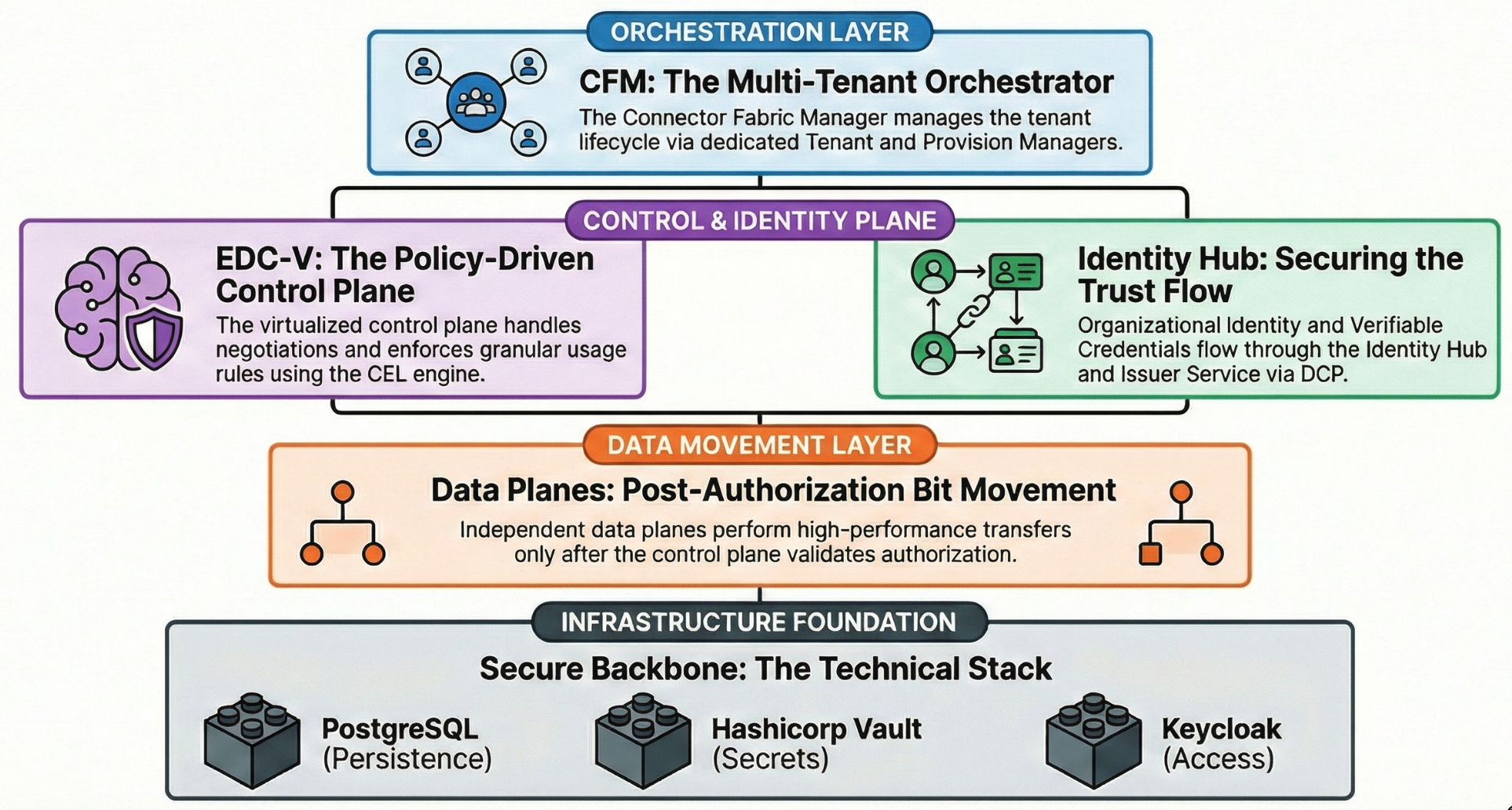
- CFM orchestrates tenant lifecycle across core services.
- Control plane (EDC-V) handles negotiation and policy; identity flows through Identity Hub and Issuer Service; data planes move the bits after authorization.
- State lives in PostgreSQL; secrets in Vault; access secured via Keycloak.
Getting JAD Running (KinD)
Prerequisites
- Docker, KinD, kubectl, Helm, Java 17+ (if building), Bruno (for API testing).
Building from source (optional)
./gradlew dockerize
kind load docker-image \
  ghcr.io/metaform/jad/controlplane:latest \
  ghcr.io/metaform/jad/identity-hub:latest \
  ghcr.io/metaform/jad/issuerservice:latest \
  ghcr.io/metaform/jad/dataplane:latest -n edcv
If you use local images, set imagePullPolicy: Never in manifests.
Step 1: Create the Cluster
cp ~/.kube/config ~/.kube/config.bak
kind create cluster -n edcv --kubeconfig ~/.kube/edcv-kind.conf
ln -sf ~/.kube/edcv-kind.conf ~/.kube/config
Step 2: Install Traefik Gateway + Gateway API
helm repo add traefik https://traefik.github.io/charts
helm repo update
helm upgrade --install --namespace traefik traefik traefik/traefik \
  --create-namespace -f values.yaml

kubectl apply --server-side --force-conflicts \
  -f https://github.com/kubernetes-sigs/gateway-api/releases/download/v1.4.1/experimental-install.yaml
Step 3: Network Access (pick one)
- Port Forward (local)
- LoadBalancer (cloud-like)
kubectl -n traefik port-forward svc/traefik 80
Install cloud-provider-kind, then verify external IP:
kubectl get svc -n traefik
Step 4: Deploy JAD
kubectl apply -f k8s/base/
kubectl wait --namespace edc-v --for=condition=ready pod --selector=type=edcv-infra --timeout=90s
kubectl apply -f k8s/apps/
kubectl wait --namespace edc-v --for=condition=complete job --all --timeout=90s
Step 5: Verify
kubectl get deployments -n edcv
kubectl get jobs -n edcv
Accessing Services
| Service | URL | Credentials |
|---|---|---|
| PostgreSQL | jdbc:postgresql://postgres.localhost/controlplane | cp / cp |
| Vault | http://vault.localhost | Token: root |
| Keycloak | http://keycloak.localhost | admin / admin |
⚠️ Demo credentials only—never use in production.
Walking Through the Demo (step by step)
Use the Bruno collection in the repo (requests/EDC-V Onboarding) to run these steps without crafting payloads manually.
Step 1: Provision participants (CFM)
- In Bruno, open CFM - Provision Consumer then CFM - Provision Provider and send both requests.
- Check Get Participant Profile until every entry in
vpasshows"state": "active"(CFM has created keys, DID, credentials, and catalog wiring).
Step 2: Seed the provider with data
- In Policy - Create CEL Expression, post the example expression.
- In Asset - Create Asset, register the asset to be shared.
- In Policy - Create Access Policy, define who can access.
- In ContractDefinition - Create, link asset + policy to publish to the catalog.
Step 3: Execute a transfer
- HTTP Proxy Transfer
- Certificate Sharing
- Consumer calls Catalog - Query to find the offer.
- Consumer sends ContractNegotiation - Initiate with required credentials.
- On agreement, consumer calls Transfer - Start HTTP Proxy; control plane signals the data plane; download the payload from the returned endpoint.
- Provider uploads a document via Data Management - Upload.
- Consumer queries catalog and finds the certificate asset.
- Consumer initiates ContractNegotiation - Initiate with credentials.
- Consumer downloads the certificate from the negotiated transfer link.
What Cloud Providers Should Study
- Multi-tenancy: ParticipantContext model in EDC-V for density and isolation.
- CFM agent architecture: Extensible, retryable operations (Vault, DNS, credential agents).
- API surface: CFM Tenant API (provisioning), Management API (assets/policies/contracts), Identity API, DSP endpoints.
- Operational patterns: Init jobs, dependency ordering, readiness probes, secrets in Vault.
Extending JAD for Your Environment
- Replace infrastructure (managed DB, managed secrets, HA/backup).
- Add your UI layer (onboarding portal, data management, ops dashboard).
- Integrate billing/metering at CFM lifecycle hooks.
- Adapt manifests for your load balancer, DNS, network policies, and monitoring.
Common Questions
Can I run JAD in production? No, use it as a blueprint and harden for production.
How do credentials get issued? Issuer Service issues VCs; authorization to issue comes from dataspace governance.
How does this relate to MVD? Minimum Viable Dataspace is a two-connector sandbox. JAD shows the hosted, multi-tenant service architecture.